
How to Fix iPhone Water Damage: 8 Steps to Try Safely
Quick Answer:
If your iPhone gets wet, disconnect all cables, wipe the exterior with a soft, lint-free cloth, and leave it in a dry place with airflow. Do not charge it while the connector is wet, use a hairdryer, or put it in rice. If the phone was submerged, won’t turn on, or shows signs of internal damage, arrange professional inspection as soon as possible.
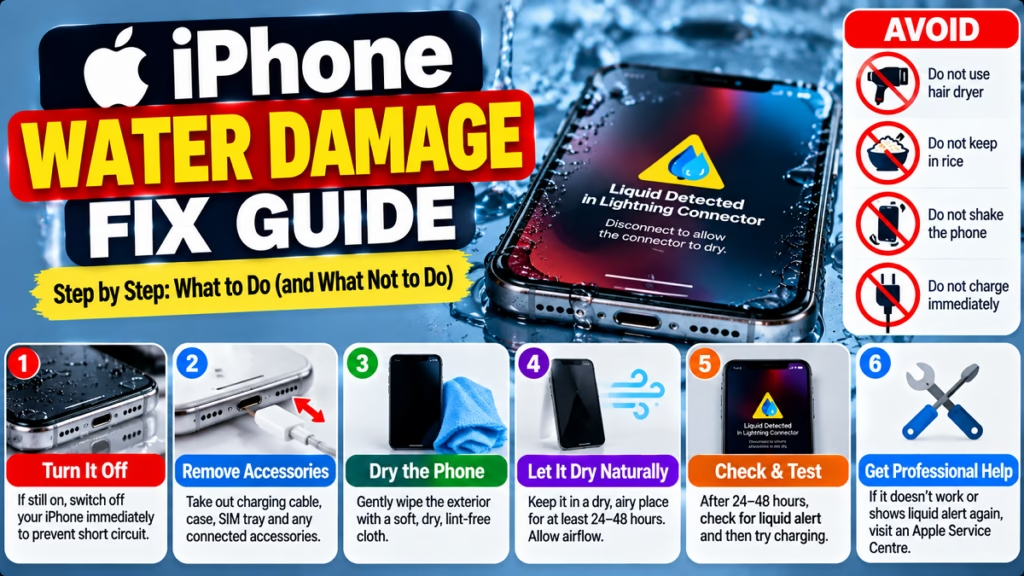
Water damage can affect an iPhone’s charging port, speakers, microphone, display, battery, and internal components. Even if the phone still works after getting wet, corrosion or other problems can appear later.
The correct response depends on how much liquid entered the device and whether the iPhone is still functioning. Follow these steps to reduce the risk of further damage.
1. Disconnect the Charger and Accessories Immediately
If your iPhone is connected to a charger, computer, or accessory, disconnect it as soon as you can do so safely.
Charging through a wet connector can corrode the contacts and cause permanent damage. <Cite refs={[“turn300158search0”]}/>
- Unplug any connected charging cable.
- Disconnect wired accessories.
- Do not reconnect the cable to test whether charging works.
- If the iPhone is visibly wet or submerged, avoid unnecessary interaction with it.
If the phone is still working, switch it off if you can do so safely. If it has been submerged or exposed to a significant amount of liquid, do not keep turning it on to check whether it works.
2. Remove the Case and Wipe the iPhone Dry
Remove the phone case and any easily removable accessories. Use a clean, soft, lint-free cloth to gently wipe the exterior.
Pay attention to the outside of the charging port, buttons, speaker openings, and camera area without pushing the cloth into openings.
If the phone has been exposed to salt water, a sugary drink, or another liquid besides fresh water, internal residue can cause additional damage. Avoid attempting to rinse the entire phone or disassemble it at home; seek model-specific guidance or professional service.
Important: Make sure the outside of the iPhone is dry before opening the SIM tray. <Cite refs={[“turn300158search4″,”turn300158search6”]}/>
3. Let the iPhone Air-Dry Naturally
Place the iPhone in a dry location with good airflow. Keep the charging connector facing down and gently tap the phone against your hand to help remove excess liquid, as Apple recommends.
Follow these precautions:
- Allow airflow around the device.
- Keep it away from humid areas.
- Do not use a hairdryer, heater, oven, or direct sunlight to force-dry it.
- Do not use compressed air.
- Do not insert cotton swabs, paper towels, or other objects into the charging port.
- Do not put the iPhone in a bag of rice.
Rice can introduce small particles into the device, while heat and compressed air may cause additional damage. <Cite refs={[“turn300158search0”]}/>
Drying time varies with the amount of liquid and where it entered. If you see a liquid-detection warning, allow the connector to dry completely; Apple notes that this can take up to 24 hours.
4. Do Not Charge the iPhone While It Is Wet
One of the biggest mistakes after water exposure is plugging the phone in immediately to see whether it still charges.
If the charging connector or cable is wet, leave them disconnected until both are completely dry.
If your iPhone supports wireless charging, it may be possible to use a compatible wireless charger after the phone’s exterior and back are completely dry. However, wireless charging does not solve internal water damage. If the phone was submerged, is behaving abnormally, or may have liquid inside, professional assessment is the safer choice.
If the iPhone displays a liquid-detection alert, do not override it simply to force charging. <Cite refs={[“turn300158search0″,”turn300158search4”]}/>
5. Check for a Liquid-Detection Alert
Some iPhone models display an alert when liquid is detected in the Lightning or USB-C connector.
You may see a message such as:
- Liquid Detected in Connector
- Charging Not Available
- Liquid has been detected in the connector
If this happens:
- Disconnect the charging cable.
- Keep the connector facing down and let excess liquid drain naturally.
- Place the phone in a dry area with airflow.
- Wait at least 30 minutes before considering another connection attempt.
- If the alert returns, continue drying for longer; it may take up to 24 hours.
Do not repeatedly reconnect the cable to test it. If the alert continues after the phone and cable are completely dry, try a known-working compatible cable only when it is safe to do so. If the alert persists, contact Apple or an authorised service provider. <Cite refs={[“turn300158search0”]}/>
6. Check Whether the iPhone Has Other Water-Damage Symptoms
After the exterior has dried, observe the phone without repeatedly powering it on or charging it.
Possible warning signs include:
- The phone will not turn on.
- The screen flickers, develops lines, or remains black.
- The speaker sounds muffled.
- The microphone stops working properly.
- The camera lens appears foggy internally.
- The device becomes unusually hot.
- Charging repeatedly disconnects.
Water in speaker or microphone openings can temporarily affect sound, but persistent symptoms may indicate a deeper problem. If the phone was submerged or multiple functions have stopped working, seek service rather than waiting for every symptom to disappear.
If the iPhone becomes unusually hot, emits an unusual smell, or shows battery swelling, stop using it and keep it away from combustible materials. Do not attempt to open it.
7. If the iPhone Is Still Working, Protect Your Data
If your iPhone is functioning normally after minor splashes, back up important information when it is safe to use the device and there are no signs of internal damage.
You can use iCloud or a computer backup, depending on your setup. However, do not connect a cable or continue using the device if the connector is wet, the phone is overheating, or there are signs of serious water damage.
If the phone was submerged or is behaving abnormally, prioritise professional inspection over attempting a backup. Do not repeatedly restart the device to see whether it has recovered.
8. Get Professional Repair if the iPhone Won’t Turn On
If your iPhone remains unresponsive, has been submerged, or develops charging or display problems after water exposure, contact Apple Support or an Apple Authorised Service Provider.
A technician can assess the charging system, battery, display, and internal components to determine the appropriate repair.
Before arranging service:
- Explain what liquid the phone was exposed to.
- Mention how long it was wet or submerged, if known.
- Describe any symptoms that appeared afterward.
- Ask about diagnostic fees and repair costs.
- Explain that preserving your data is important.
Water damage is not always limited to the charging port. Replacing a port or battery without diagnosing other affected components may not resolve the underlying problem.
Apple states that liquid damage is not covered by its standard one-year limited warranty, although consumer-law rights or other coverage may apply depending on the situation. <Cite refs={[“turn300158search5″,”turn300158search10”]}/>
What Not to Do When Your iPhone Gets Wet
| Avoid this | Why |
|---|---|
| Charging immediately | A wet connector can corrode or become damaged |
| Using a hairdryer or heater | Heat may damage components |
| Putting the phone in rice | Particles can enter the connector |
| Inserting a pin or cotton swab | Internal contacts can be damaged |
| Repeatedly turning it on | May worsen problems if liquid has reached internal components |
| Opening the phone without proper tools | Can damage seals, cables, or the battery |
Frequently Asked Questions
Can an iPhone recover from water damage?
Yes, some iPhones recover after minor liquid exposure when handled correctly. However, recovery is not guaranteed, particularly after submersion, salt-water exposure, or liquid entering internal components. Persistent symptoms require professional inspection.
How long should I let my iPhone dry after getting wet?
The time depends on the amount of liquid and where it entered. Apple says a wet charging connector can take up to 24 hours to dry fully. This does not guarantee that the phone’s internal components are dry or undamaged.
Can I charge my iPhone after it gets wet?
Do not charge it through a wet connector. Disconnect cables and wait until the iPhone and connector are completely dry. If the phone was submerged or shows other signs of damage, get professional advice before attempting to charge it.
Does putting an iPhone in rice fix water damage?
No. Apple advises against putting an iPhone in rice because small particles can damage the device. Use a dry location with airflow and avoid heat or objects inside the charging connector.
What should I do if my iPhone won’t turn on after water damage?
Do not keep trying to turn it on or connect it to a charger. If it was submerged or is completely unresponsive after getting wet, arrange professional inspection as soon as possible.
Is iPhone water damage covered by warranty?
Apple’s standard one-year limited warranty does not cover liquid damage. Coverage may vary depending on your service plan and applicable consumer-law rights, so check your specific coverage and repair options.
Final Words
If your iPhone gets wet, act quickly but avoid risky DIY fixes. Disconnect cables, wipe the exterior, allow airflow, and do not use heat or rice. Never charge the phone through a wet connector.
If the iPhone was submerged, won’t turn on, overheats, or develops persistent problems, professional inspection is the safest next step. Drying can remove moisture from accessible areas, but it cannot guarantee that internal components have escaped damage.
iPhone Water Damage, Wet iPhone, iPhone Repair, iPhone Liquid Detected, iPhone Not Turning On, iPhone Charging Problem, Mobile Troubleshooting

Hindimeto.com एक हिंदी ब्लॉग है जो आपको विभिन्न विषयों पर जानकारी देता है। इस ब्लॉग का संस्थापक और प्रबंधक Avi Sharma है, जो एक पेशेवर ब्लॉगर और लेखक हैं।
Avi Sharma ने इस ब्लॉग को 2020 में शुरू किया था, जब उन्होंने अपनी पहली पोस्ट Tech के बारे में लिखी थी। उनका लक्ष्य था कि वे अपने अनुभव और ज्ञान को लोगों के साथ साझा करें और उन्हें हिंदी में उपयोगी और रोचक सामग्री प्रदान करें।
आज, Hindimeto.com एक लोकप्रिय और विश्वसनीय हिंदी ब्लॉग बन गया है, जो आपको Tech, Mobile, Apps, Make money, Biography article, Government scheme जैसे विषयों पर अद्भुत और गहन जानकारी देता है।