OPPO Phone Hang? How to Restart a Frozen Phone
Is your OPPO phone hanging, frozen on one screen, or not responding when you touch the display? You may be unable to open Settings or use the normal Restart option. In many cases, you can try a force restart using the physical buttons.
This guide explains how to restart a frozen OPPO phone, what to do if the screen is black, and how to reduce repeated hanging problems.
Quick Answer:
If your OPPO phone is frozen, try these steps:
- Disconnect the charger if the phone is connected to one.
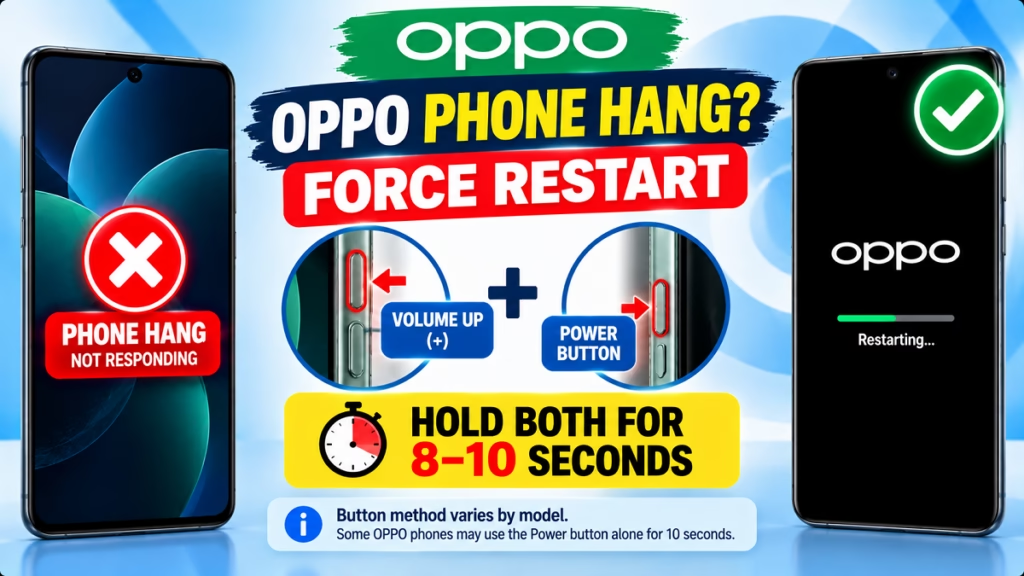
- Press and hold the Power button + Volume Up (+) together for at least 8 seconds.
- Release the buttons when the OPPO logo appears.
- Wait for the phone to restart.
On some OPPO models, holding the Power button alone for around 10 seconds may work. The exact method can vary by model. <Cite refs={[“turn533490search0″,”turn533490search4”]}/>
Method 1: Force Restart a Frozen OPPO Phone
Use this method if your phone is switched on but the touchscreen, apps, or system has stopped responding.
Step 1: Locate the buttons
Find the Power button and Volume Up button on the side of your OPPO phone.
Step 2: Press both buttons together
Press and hold Power and Volume Up simultaneously.
Step 3: Keep holding for at least 8 seconds
Continue holding until the OPPO logo appears or the phone begins restarting.
Step 4: Wait for startup
Release the buttons and allow the phone to boot normally.
OPPO’s official support guide recommends this combination for supported smartphones. If it does not work, check the instructions for your specific model. <Cite refs={[“turn533490search0”]}/>
Method 2: Restart OPPO When the Touchscreen Works
If your phone is slow but still responds to touch, try a normal restart.
- Press and hold the Power button.
- If a power menu appears, select the restart option.
- Follow any on-screen instructions to confirm.
On some OPPO phones, you may need to press Power and Volume Up together to open the power menu. The exact controls depend on your model and ColorOS version.
Method 3: What If Your OPPO Phone Has a Black Screen?
A black screen can happen because of a temporary system freeze, a drained battery, or a display or hardware issue.
Try the following steps:
- Connect your phone to a compatible charger.
- Leave it charging for around 15–30 minutes.
- Disconnect the charger before attempting a force restart.
- Hold Power + Volume Up for at least 8 seconds.
- If your model supports it, try holding Power alone for around 10 seconds.
If the phone vibrates or rings but the display remains black, the problem may involve the screen rather than the software. If it still does not respond, contact OPPO Support. <Cite refs={[“turn533490search0″,”turn533490search2”]}/>
Why Does an OPPO Phone Keep Hanging?
A force restart can resolve a temporary freeze, but it may not fix the underlying cause.
1. Low Storage Space
When internal storage is almost full, apps and system processes may struggle to run smoothly. After restarting, check storage and remove unnecessary files only after backing up anything important.
2. Too Many Apps Running
Multiple resource-intensive apps can slow down your phone. Close apps you are not using and check whether one particular app repeatedly causes freezing.
3. Outdated Apps or Software
Software bugs can sometimes make a phone unresponsive. Check for available app and system updates once your device is working normally.
4. Overheating
Gaming, extended camera use, or heavy workloads can make your phone unusually warm. Stop demanding activities and let the phone cool naturally, away from direct sunlight.
5. A Problem With an App or Hardware
If the phone repeatedly freezes after opening a particular app, update or uninstall that app. If it keeps freezing during startup or does not respond to physical buttons, professional diagnosis may be necessary.
How to Prevent Your OPPO Phone From Hanging Again
After restarting your phone, follow these precautions:
- Keep sufficient internal storage free.
- Update apps and ColorOS when appropriate.
- Remove apps that repeatedly crash or cause freezing.
- Avoid running too many demanding apps simultaneously.
- Let the phone cool down if it becomes unusually hot.
- Back up important photos, contacts, and documents regularly.
If the problem continues, back up your data before trying advanced troubleshooting. A factory reset should be a last resort because it erases data stored on your phone.
When Should You Contact OPPO Support?
Contact an authorised service centre if:
- Your phone does not respond to the force-restart combination.
- It repeatedly gets stuck on the OPPO logo.
- The display remains black despite signs that the phone is switched on.
- The Power or Volume button is physically damaged.
- The phone was exposed to water or liquid.
- It keeps freezing after basic troubleshooting.
Visit the official OPPO India Support website for troubleshooting assistance and service options. <Cite refs={[“turn533490search0”]}/>
Frequently Asked Questions
1. How do I restart an OPPO phone when it is hanging?
On supported models, press and hold Power + Volume Up together for at least 8 seconds, until the OPPO logo appears. Some models use the Power button alone for around 10 seconds.
2. Will force restarting my OPPO phone delete my data?
A normal force restart does not usually erase personal data. However, factory reset and data-formatting options are different and can erase your files and apps.
3. What if my OPPO Power button is not working?
If the physical button is damaged, the standard force-restart method may not work. If the screen responds, use the available on-screen power menu. Otherwise, contact an authorised service centre.
4. Why does my OPPO phone hang repeatedly?
Common causes include low storage, problematic apps, overheating, software issues, or hardware faults. If the problem persists after restarting, investigate the underlying cause.
5. What should I do if my OPPO phone is stuck on the logo?
Try the supported force-restart method first. If the phone repeatedly returns to the OPPO logo or enters Recovery mode, contact OPPO Support before attempting a reset that could erase data.
Final Words
If your OPPO phone is hanging, start by trying the Power + Volume Up force-restart combination. Hold both buttons for at least 8 seconds on supported models, or try the Power button alone for around 10 seconds if your model supports it.
If the phone continues to hang, check its storage, apps, and temperature. Persistent freezing, a black screen, or repeated startup failures may require professional assistance.
OPPO Phone Hang, OPPO Phone Restart, Frozen Phone Fix, OPPO Troubleshooting, Android Problems, Mobile Problems

Hindimeto.com एक हिंदी ब्लॉग है जो आपको विभिन्न विषयों पर जानकारी देता है। इस ब्लॉग का संस्थापक और प्रबंधक Avi Sharma है, जो एक पेशेवर ब्लॉगर और लेखक हैं।
Avi Sharma ने इस ब्लॉग को 2020 में शुरू किया था, जब उन्होंने अपनी पहली पोस्ट Tech के बारे में लिखी थी। उनका लक्ष्य था कि वे अपने अनुभव और ज्ञान को लोगों के साथ साझा करें और उन्हें हिंदी में उपयोगी और रोचक सामग्री प्रदान करें।
आज, Hindimeto.com एक लोकप्रिय और विश्वसनीय हिंदी ब्लॉग बन गया है, जो आपको Tech, Mobile, Apps, Make money, Biography article, Government scheme जैसे विषयों पर अद्भुत और गहन जानकारी देता है।