Why Is Your Samsung Phone Screen Not Working but the Phone Is On?
A Samsung phone may still ring, vibrate, receive calls, or make notification sounds even when its display stays black. This usually means the phone is receiving power, but it does not necessarily mean the display itself is working.
Possible causes include a temporary software crash, a damaged display panel, a loose internal display connection, liquid damage, or a battery or power-related issue. The right solution depends on whether the screen is completely black, showing an image without responding to touch, or flickering.
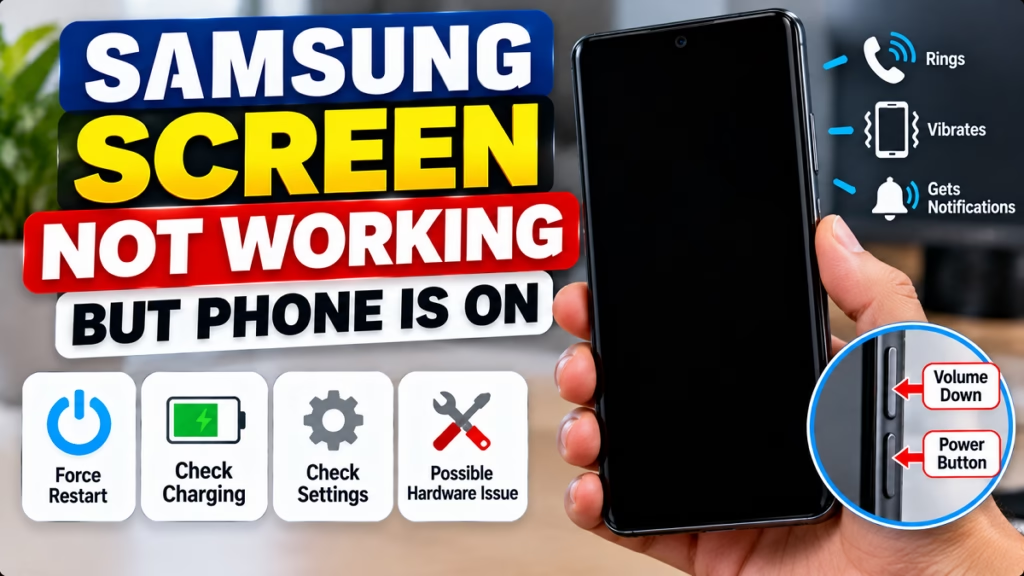
1. Force Restart Your Samsung Phone
A temporary system freeze can make the screen appear dead even though the phone is still running.

Step 1: Locate the Side/Power button and Volume Down button.
Step 2: Press and hold both buttons simultaneously for approximately 20 seconds, or until the phone restarts.
Step 3: Wait for the Samsung logo and check whether the display returns.
This is a force restart, not a factory reset, so it is not intended to erase your data. Samsung recommends this procedure for a blank or black display.
2. Charge the Phone and Check for Signs of Life
If the screen remains black after restarting:
- Connect the phone to a compatible, working charger.
- Leave it charging for up to an hour.
- Check whether it vibrates, rings, or produces charging sounds.
- Try calling the phone from another device.
A charging icon may take several minutes to appear. If the phone becomes unusually hot, smells burnt, or has a swollen battery, disconnect power if safe and stop using it.
3. Check Whether the Display Is Black or the Touchscreen Is Not Working
These are two different problems, and the distinction helps narrow down the cause.
| What you notice | Possible explanation |
|---|---|
| Phone rings, but the screen is completely black | Display, display connection, or system fault |
| Screen shows the lock screen but does not respond to touch | Touch digitizer, screen protector, or software issue |
| Screen flickers or shows colored lines | Display damage or a software/display fault |
| Screen works after a force restart | Temporary software freeze may have caused the problem |
| Screen went black after a drop or liquid exposure | Physical or liquid damage is possible |
These symptoms are clues, not a confirmed diagnosis. A technician may need to inspect the phone to distinguish a screen failure from a motherboard or connection fault.
4. Remove Accessories and Check the Screen
If the screen displays an image but touch is unreliable:
- Remove the phone case and any accessories that press against the screen.
- Check whether the screen protector is cracked, peeling, or trapping debris.
- Clean the screen gently with a soft, dry cloth.
- If the screen is cracked, avoid pressing hard on it.
Samsung notes that screen protectors and physical damage can affect touchscreen operation.
If the display remains completely black, removing the screen protector is unlikely to fix a failed display panel.
5. How to Recover Your Data if the Samsung Screen Is Dead
If your phone is still running, protect your data before attempting anything destructive.
- Check cloud backups: Photos, contacts, and other data may already be synced with your Google or Samsung account.
- Use a computer: If the phone was previously authorized and unlocked, you may be able to access files or create a backup, depending on its connection and security state.
- Try an external display: Some Samsung models support video output to a monitor or TV through a compatible USB-C adapter. This does not work on every model.
- Use a repair service: If the display is completely dead and you cannot unlock the phone, a screen repair may be needed to access data.
Samsung describes several possible data-access methods, including Smart Switch, a mouse or keyboard, and an external display, but availability depends on the device and its condition.
Important: Do not factory-reset the phone just to fix a black screen. A reset can erase data and will not repair physically damaged display hardware.
6. When to Get Your Samsung Screen Repaired
Seek professional inspection if:
- The screen stays black after a force restart and charging.
- The phone was dropped shortly before the problem started.
- The phone was exposed to water or another liquid.
- The screen has lines, black patches, flickering, or visible cracks.
- The phone continues to ring and vibrate but never displays an image.
Use Samsung’s official India Support and Service Centre page to find authorized repair options
Frequently Asked Questions
Why is my Samsung phone on but the screen is black?
A temporary software freeze, display-panel failure, damaged display connection, or liquid damage can cause this symptom. Try a force restart first; if the display remains black, service may be necessary.
Can I fix a black Samsung screen without replacing it?
Sometimes. If the problem is a temporary software freeze, a force restart may restore the display. If the display panel or its connection is damaged, repair may be required.
Will a force restart delete my data?
A normal force restart is not designed to erase data. Avoid selecting factory reset or wipe-data options when troubleshooting a black screen.
Why does my Samsung phone ring but show nothing?
The phone may still be operating while the display system is failing. If calls and notifications work but the screen stays black after restarting, arrange a hardware inspection.
Can I transfer data from a Samsung phone with a broken screen?
Possibly. Cloud backups, Smart Switch, or an external display may help, depending on the model, whether the phone can be unlocked, and which features it supports.
Conclusion
If your Samsung screen is not working but the phone is on, begin with a force restart and a charging check. If the phone continues to ring or vibrate while the display remains black, do not assume a factory reset will solve the issue. Protect your data and arrange a display inspection if basic troubleshooting fails.
For other phone issues, see our Mobile Phone Problems Fix Guide on HindiMeTo.
Samsung Screen Problem, Samsung Black Screen, Samsung Phone Troubleshooting, Samsung Display Issue, Android Black Screen, Phone Repair, Mobile Phone Problems

Hindimeto.com एक हिंदी ब्लॉग है जो आपको विभिन्न विषयों पर जानकारी देता है। इस ब्लॉग का संस्थापक और प्रबंधक Avi Sharma है, जो एक पेशेवर ब्लॉगर और लेखक हैं।
Avi Sharma ने इस ब्लॉग को 2020 में शुरू किया था, जब उन्होंने अपनी पहली पोस्ट Tech के बारे में लिखी थी। उनका लक्ष्य था कि वे अपने अनुभव और ज्ञान को लोगों के साथ साझा करें और उन्हें हिंदी में उपयोगी और रोचक सामग्री प्रदान करें।
आज, Hindimeto.com एक लोकप्रिय और विश्वसनीय हिंदी ब्लॉग बन गया है, जो आपको Tech, Mobile, Apps, Make money, Biography article, Government scheme जैसे विषयों पर अद्भुत और गहन जानकारी देता है।